
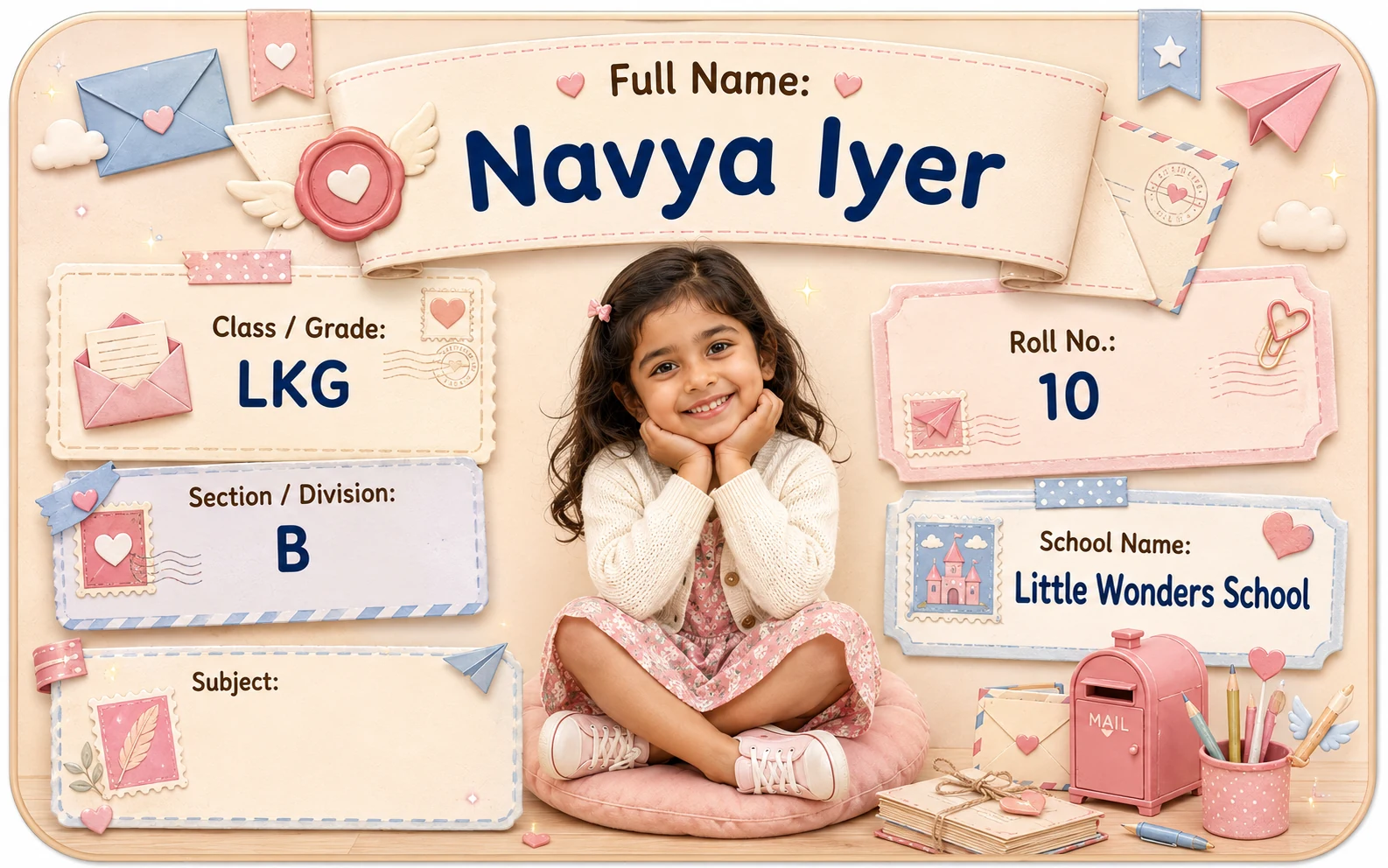
Quick answer: what kind of photo works best for a personalized Name Slip?
A strong starting photo usually has:
- one clearly visible child,
- face reasonably close to camera,
- eyes/face not heavily covered,
- some space around the head for cropping,
- enough light to see facial features,
- a background that does not overwhelm the child.
You do not automatically need:
- a professional photo,
- a white background,
- a passport-style pose,
- studio lighting,
- a formal school photograph.
What matters most is whether the child remains recognizable in the final personalized preview.
On this page
- Quick answer: what kind of photo works best for a personalized Name Slip?
- The five checks at a glance
- 1. FACE VISIBILITY — can you recognize the child quickly?
- Is a front-facing photo always better?
- Should the child smile?
- Should the photo contain only one child?
- 2. CROP — leave room for the design to work
- How much space should there be around the head?
- Is a close-up better than a full-body photo?
- Should I crop the photo myself first?
- 3. BACKGROUND — does the child stand out?
- When does a background become too busy?
- Does the background need to match the Name Slip theme?
- What about a white background?
- 4. LIGHT — is the face clear enough after reduction?
- What kind of lighting can create problems?
- Is outdoor light better than indoor light?
- Should I brighten the photo before uploading?
- 5. PREVIEW — this is the final decision
- The Dimple preview rule
- What if the photo looks good but the name becomes too small?
- What if the child has long hair, a hat or accessories?
- What if the child is wearing school uniform?
- What if the child is wearing very bright colors?
- What about selfies?
- What about screenshots from a video?
- What about photos downloaded from WhatsApp or social media?
- Should I use the newest photo?
- Should I use the same photo on every school item?
- What if the child does not want their photo on school belongings?
- Photo quality vs photo privacy are different questions
- Photo choice by Name Slip density
- Photo choice by Name Slip size
- 8 photo mistakes to avoid
- The Dimple five-check photo test
- A practical 30-second photo shortlist
- Should I use portrait or landscape orientation?
- Should the face be centered?
- Do I need a plain background?
- What if the photo has toys or decorations?
- What if the photo has text in the background?
- What if the child is wearing glasses?
- What about masks or face coverings?
- What about background removal?
- What file type should I upload?
- How should parents compare two good photos?
- Before you approve
Neutral editorial examples using fictional details. These are not Dimple product previews or promises of editable layouts.
A photo can look lovely on your phone and still work poorly on a small Name Slip.
Why?
Because a personalized school Name Slip is not displaying the entire photograph.
The design may need to:
- crop the image,
- reduce it,
- place text beside it,
- fit a theme around it,
- keep the child’s name readable,
- balance class/section/roll details.
That changes what makes a photo “good.”
For a Name Slip, the most useful photo is not necessarily:
the most artistic, the most recent, the most professionally taken, or the one with the prettiest background.
The most useful photo is the one that still makes the child easy to recognize after the photo becomes small and enters the real personalized layout.
Use five checks:
Face Visibility → Crop → Background → Light → Preview
The five checks at a glance
| Check | What to look for | Common problem |
|---|---|---|
| Face visibility | Child’s face is easy to identify | Face hidden, tiny or turned too far away |
| Crop | Some space exists around head/face | Photo is already too tightly cropped |
| Background | Child stands out clearly | Busy background competes with face |
| Light | Facial features remain visible | Strong shadow or very dark image |
| Preview | Final Name Slip remains balanced | Photo looks fine alone but awkward in layout |
1. FACE VISIBILITY — can you recognize the child quickly?
The photo’s first job is simple:
show the child clearly enough to be recognizable.
A photo may be less suitable when:
- the child is very far away,
- most of the face is hidden,
- the head is extremely small inside a large scene,
- another person is blocking the child,
- the face is heavily blurred,
- the photo is mostly the child’s back,
- a large object covers key facial features.
This does not mean the child must look directly into the camera.
A slight side angle can still work.
The question is:
Will this face still be easy to recognize when the image becomes much smaller?
Is a front-facing photo always better?
Not always.
A fully front-facing image can be convenient because:
- both sides of the face are visible,
- the crop is usually easier,
- the face can remain centered.
But a slight angle can still work very well.
A side-facing or candid image becomes less useful when:
- only a small part of the face is visible,
- the face is looking completely away,
- the crop becomes difficult,
- the child's features become unclear after reduction.
The final preview matters more than a rigid posing rule.
Should the child smile?
A smile is optional.
A Name Slip is an identification/personalization product, not a school-photo standard.
Choose the expression that:
- looks natural,
- clearly shows the child,
- fits the photo you like.
Do not reject a clear photo just because the child is not smiling.
Should the photo contain only one child?
A single-child photo is usually easier to use. A group photo can make the intended face unclear or leave too little crop room. Dimple’s current Name Slip sheet is personalized for one child; use that child’s authorized photo.
2. CROP — leave room for the design to work
Cropping is one of the most important parts of photo personalization.
A photo that is already cropped tightly around the child’s forehead, chin or hair may leave little room for the final design.
For example:
Better crop flexibility
The original photo shows:
- full head,
- some shoulder area,
- some space around hair,
- some room above the head.
Harder crop
The original photo cuts:
- top of head,
- chin,
- one side of face,
- hair/accessories.
The safest principle is:
Give the final design some room to crop.
How much space should there be around the head?
There is no universal pixel or percentage rule for every theme. Keep enough original image around the hair, forehead, chin and face for the template’s composition, then inspect the actual preview. Avoid aggressive pre-cropping.
Is a close-up better than a full-body photo?
For a small Name Slip, a face-oriented photo usually gives the face more usable visual area than a distant full-body image.
A full-body photo can still work if:
- the child occupies enough of the original frame,
- the face remains clear,
- the personalization workflow can crop appropriately.
But if the child is tiny within a large playground or landscape scene, the final face may become too small.
The question is not:
full body vs portrait
It is:
how much useful face area survives after the final crop?
Should I crop the photo myself first?
Avoid an unnecessarily tight crop. Start with a strong original photo, upload it through the current form and inspect the personalized result. If the crop is awkward, try a more suitable source image or another available design. This advice does not assume manual crop controls.
3. BACKGROUND — does the child stand out?
A clean background can help.
But “clean” does not mean:
plain white only.
Good backgrounds can include:
- a simple wall,
- soft indoor setting,
- garden,
- school setting,
- neutral room,
- lightly blurred environment.
The real question is:
Does the child visually stand out from the background?
When does a background become too busy?
A background can compete with the face when it contains:
- many people,
- strong patterns,
- bright signs,
- toys around the head,
- high-contrast objects,
- another face close by,
- strong visual clutter.
This matters more after the photo becomes small.
A background detail that feels harmless on a phone screen may compete strongly inside a compact Name Slip.
Does the background need to match the Name Slip theme?
No.
Do not force parents to find:
- unicorn background for a unicorn theme,
- space background for a space theme,
- racing background for a racing theme.
The product design itself already provides the theme.
The photo’s job is mainly to make the child recognizable.
Trying too hard to “theme” the original photo can create unnecessary clutter.
What about a white background?
A white background can work.
But it is not automatically better.
A very bright white background combined with a bright face area may reduce separation in some layouts.
A darker background can also work if the face remains clear.
Again:
readability in the actual preview matters more than the background color by itself.
4. LIGHT — is the face clear enough after reduction?
Lighting affects how much facial detail survives when the photo becomes small.
A useful photo usually has:
- enough light on the face,
- no extreme shadow across most of the face,
- no heavy overexposure,
- visible facial features.
You do not need studio lighting.
Natural indoor or outdoor light can work very well.
What kind of lighting can create problems?
A face in deep shadow, strong backlighting, heavy overexposure or an aggressive filter can hide useful detail when the image becomes small. Choose a naturally clear image rather than following a technical lighting formula.
Is outdoor light better than indoor light?
Not automatically.
Outdoor light can be excellent.
So can indoor light near a window.
Either can be poor if:
- the face is too dark,
- direct sun creates harsh shadow,
- the image is blurred,
- the background overwhelms the child.
The environment is secondary.
The face clarity is primary.
Should I brighten the photo before uploading?
Only if needed.
Minor corrections may help a dark image.
But aggressive editing can create:
- washed-out skin,
- loss of detail,
- unnatural contrast,
- noisy/sharp edges.
Do not over-edit just to make the photo “pop.”
A naturally clear image is usually easier to judge.
5. PREVIEW — this is the final decision
The personalized preview matters because a photo can pass the first four checks and still look awkward inside a specific design.
The final preview should answer:
- Is the face still visible?
- Has the head been cropped awkwardly?
- Is the child’s name still readable?
- Does the photo compete with the theme?
- Does the photo occupy too much space?
- Are school details still clear?
- Does the final design feel balanced?
The correct photo is not the one that wins in the phone gallery.
It is the one that works in the finished personalized layout.
The Dimple preview rule
Use this rule:
Do not approve the photo in isolation. Approve the photo inside the Name Slip.
That brings the photo and the identifying details into the same decision.
The product preview is where:
photo, name, class, section, roll number, theme, and size
all meet.
What if the photo looks good but the name becomes too small?
Then the overall layout is too dense.
Do not solve that by prioritizing the photo at all costs.
Consider:
- reducing optional school fields,
- choosing a layout with more text room,
- selecting another photo crop,
- choosing a larger Name Slip size where appropriate.
For the layout hierarchy:
For size:
What Size Name Slip Do You Need? A Visual Guide for School Books, Notebooks, Files & Pencil Boxes
What if the child has long hair, a hat or accessories?
The goal is not to remove personality.
Hair, hats and accessories can be part of the child’s real appearance.
The practical question is:
Do they make the face harder to recognize or harder to crop?
For example:
- a wide hat may need more crop room,
- large costume elements may dominate the image,
- hair covering most of the face may reduce visibility.
The guidance is purely about visibility and crop.
What if the child is wearing school uniform?
A uniform photo and a casual photo can both work. Choose the image that represents the child as the family prefers and stays recognizable in the final layout. Uniform alone does not improve image quality.
What if the child is wearing very bright colors?
That can still work.
The concern is only whether the clothing dominates the photo or clashes strongly with the theme.
But do not over-optimize clothing for a Name Slip.
Face visibility remains more important than shirt color.
What about selfies?
A selfie can work if:
- the face is clear,
- the image is not distorted,
- the crop has enough room,
- the lighting is good.
Potential problems include:
- extreme close-up,
- wide-angle distortion,
- awkward cropping,
- another person appearing partly in frame.
Do not reject a selfie automatically.
What about screenshots from a video?
A video screenshot can work if it is sufficiently clear.
However, motion blur or low resolution may become more obvious after cropping.
The actual preview should decide.
What about photos downloaded from WhatsApp or social media?
Compressed images may lose detail.
But do not state a universal technical threshold.
If the image still looks clear at the final personalized preview size, it may work.
The safer guidance is:
When possible, use the original photo rather than a repeatedly compressed copy.
Should I use the newest photo?
Not necessarily.
Use the most suitable current-looking photo.
A slightly older photo may work better than a new but blurry/distant image.
A newer photo may be preferable if:
- the child’s appearance changed significantly,
- the parent simply prefers a more recent image.
The product does not require an annual photo update unless the current Dimple system explicitly says otherwise.
Should I use the same photo on every school item?
That is a family preference. A consistent photo can help distinguish belongings, but separate items may use different approaches. Within Dimple’s current Name Slip sheet, one selected child/details/theme set applies to the sheet.
What if the child does not want their photo on school belongings?
Choose another suitable labeling method if photo personalization is not wanted. Dimple’s current Name Slip ordering flow requires a child photo; it does not offer a text-only Name Slip through the same flow. For the broader choice, see photo Name Slips versus text-only Name Labels.
Photo quality vs photo privacy are different questions
A technically clear photo can still be a poor privacy fit for a particular item.
For example:
a photo Name Slip inside a notebook
and:
a photo displayed on the outside of a public-facing school bag
are different contexts.
Do not confuse:
good image quality
with:
appropriate information exposure.
For broader field/privacy decisions:
What Should You Put on a Child’s School Name Slip? Name, Class, Section, Roll Number & Privacy Guide
Photo choice by Name Slip density
LOW DENSITY
Photo + Name
The photo has more breathing room.
MEDIUM DENSITY
Photo + Name + Class/Section
Balance becomes more important.
HIGH DENSITY
Photo + Name + Class + Section + Roll No.
The photo competes with more text.
High-density formats need:
- cleaner crop,
- stronger hierarchy,
- careful preview.
For format guidance:
Photo choice by Name Slip size
Dimple’s current Name Slip sheet is designed with two individual slip sizes:
- 20 large slips — approximately 8.5 × 5 cm
- 5 small slips — approximately 5 × 4 cm
One child/details/theme set is used per sheet.
A smaller slip gives the photo less visual room.
That means:
- distant faces become harder to use,
- busy backgrounds become more distracting,
- long names and multiple fields compete more strongly.
A larger slip can provide more layout room, but it still does not fix a poor source photo.
8 photo mistakes to avoid
1. Using a photo where the child is tiny
A wide scene may look beautiful but give too little face area.
2. Uploading an already over-cropped photo
The final design has no room to adjust.
3. Choosing a photo with another face beside the child
The crop may become ambiguous.
4. Using a very dark face
Important facial detail can disappear after reduction.
5. Choosing an extremely busy background
The child no longer remains the focal point.
6. Over-editing with strong filters
The image may lose natural detail.
7. Ignoring the name/text after choosing the photo
The photo is only one element in the full Name Slip.
8. Approving without checking the actual personalized preview
This is the biggest mistake.
The Dimple five-check photo test
Before approving, ask:
FACE VISIBILITY
Can I recognize the child quickly?
CROP
Is the head/face cropped naturally?
BACKGROUND
Does the child stand out clearly?
LIGHT
Can I see the face without deep shadow or washout?
PREVIEW
Does the complete Name Slip still look balanced?
If all five pass, the photo is likely a strong fit.
A practical 30-second photo shortlist
If you have ten photos and do not know which to choose:
Remove first
- very blurry images
- photos where child is tiny
- photos with face heavily hidden
- photos with extremely tight crop
Then compare
- face clarity
- crop room
- background simplicity
- lighting
Final step
Upload the best 2–3 candidates one at a time if the workflow permits and compare the personalized previews.
Do not choose entirely from the phone gallery.
Should I use portrait or landscape orientation?
Either can work.
A portrait-oriented photo may naturally give more face/upper-body area.
A landscape photo may still work if the child occupies enough of the frame.
The product crop determines the final result.
“portrait only”
rule unless the current Dimple upload system requires it.
Should the face be centered?
A centered face is often easy to crop.
But it is not mandatory.
A slightly off-center face can still work if:
- the crop has room,
- the template composition supports it,
- the final preview remains balanced.
Again:
preview beats rigid photography rules.
Do I need a plain background?
No.
Use a plain background when convenient.
But a clean real-world background is also fine.
The relevant distinction is:
simple enough to keep attention on the child
not:
studio vs non-studio.
What if the photo has toys or decorations?
That can work if they do not:
- cover the face,
- dominate the crop,
- make the design visually chaotic.
A favorite toy may even make the photo feel personal.
The Name Slip theme already carries decorative weight, so extra clutter is usually unnecessary.
What if the photo has text in the background?
Be careful.
Background text can:
- create visual noise,
- become partially cropped,
- conflict with the child’s name,
- create accidental unreadable fragments.
A simpler crop may work better.
What if the child is wearing glasses?
Glasses are fine.
The only issue is whether strong reflection hides the eyes/face.
Do not recommend removing glasses if they are part of the child’s normal appearance.
A recognizable real photo is more valuable than forcing a different look solely for the label.
What about masks or face coverings?
If much of the face is covered, recognition can become harder.
However, do not make cultural/religious assumptions.
The practical guidance is:
choose an image that reflects the child as the family wants them represented while still considering whether enough distinguishing facial/visual information remains for the intended use.
What about background removal?
Judge the photo treatment shown in the actual product preview. Do not choose a photo on the assumption that its background will automatically be removed. A source image where the child already stands out gives you a clearer starting point.
What file type should I upload?
Follow the file guidance and validation shown by the current upload form. A file that uploads successfully still needs a visual check in the personalized preview. This guide does not promise support for every format or a universal minimum resolution.
How should parents compare two good photos?
If two photos both look clear, choose using the final layout.
Photo A may have:
- better expression,
- but tighter crop.
Photo B may have:
- simpler background,
- more crop room.
There is no abstract winner.
Generate or inspect the personalized preview.
The better Name Slip photo is the one that produces the better final Name Slip, not necessarily the better standalone photograph.
Before you approve
The best photo for a personalized Name Slip does not need to be perfect.
It needs to work at small scale.
Use:
Face Visibility → Crop → Background → Light → Preview
Choose a photo where:
- the child is easy to recognize,
- the crop has room,
- the background does not overwhelm the face,
- the lighting keeps facial details visible,
- the final personalized layout still looks balanced.
Do not over-focus on:
studio backgrounds, perfect poses, professional photography, or rigid rules.
The final preview is the real test.
A strong photo is not the one that looks best alone.
It is the one that still works when the Name Slip also has to carry:
the child’s name, school details and the Dimple design around it.
For related decisions, see keeping long names readable.
Frequently asked questions
What type of photo is best for a personalized Name Slip?
A clear photo where the child’s face is easy to recognize, has enough crop room, is reasonably well lit and does not have an overly distracting background is a strong starting point.
Does the photo need a white background?
No. A plain background can help, but it is not required. The child simply needs to remain visually clear in the final personalized layout.
Should I use a close-up photo?
A face-oriented photo often works well because the child remains recognizable after the image becomes small. Avoid an extreme close-up that leaves no room for cropping.
Can I use a selfie?
Yes, if the face is clear, the crop is usable and the final preview looks balanced.
Can I use a group photo?
A single-child photo is usually easier. A group image can make cropping and identification more difficult.
Does the child need to smile?
No. A smile is optional. Choose a natural, clear photo where the child remains recognizable.
Should I edit or brighten the photo first?
Only if needed. Avoid aggressive filters or over-editing. The most important test is how the image looks in the personalized preview.
Should I crop the photo before uploading?
Avoid very aggressive pre-cropping. Leaving some room around the face can give the final design more flexibility.
What if the Name Slip preview cuts off the hair or face?
Try another photo with more crop room or use a different available layout/theme if the product workflow supports it. Do not approve an awkward crop merely because the original photo was your favorite.
Do I need a professional photo?
No. A normal family photo can work well if the child’s face is clear and the final preview looks good.
Ready to check a design with your child’s details?
Choose a Name Slip design
Compare the current designs and inspect the personalized preview before ordering.
Browse Dimple Name SlipsUnderstand the steps
See how details, photo, preview review and ordering fit together.
How personalization works